1
/
of
1
HP
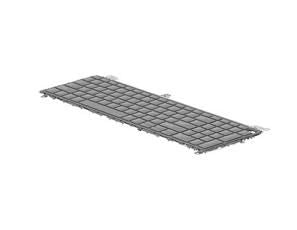
HP P34777-B31 EliteBook 8 G1i Dutch Backlit Spill-Resistant Keyboard
Dutch layout keyboard | Backlit keys for visibility | Spill-resistant design | For HP EliteBook 8 G1i
Regular price
£102.13 GBP
(incl. VAT)
Regular price
Sale price
£102.13 GBP
(incl. VAT)
Unit price
/
per
Shipping calculated at checkout.
In stock: 0
Couldn't load pickup availability
- Trusted by Thousands
- Order with confidence
- Fully tracked shipping
Product Description:
Enhance your HP EliteBook 8 G1i with the HP P34777-B31 keyboard. This genuine replacement features a Dutch layout, backlit keys for improved visibility, and a spill-resistant design for everyday reliability.
Key Features:
- Genuine HP replacement part
- Backlit keys for low-light use
- Spill-resistant construction
- Dutch language layout
What's Included:
- 1 x HP P34777-B31 Dutch Backlit Keyboard
Warranty and Certification:
- 3-month warranty included
- CE and RoHS compliant for safety and quality
Key Features:
- Genuine HP replacement part
- Backlit keys for low-light use
- Spill-resistant construction
- Dutch language layout
What's Included:
- 1 x HP P34777-B31 Dutch Backlit Keyboard
Warranty and Certification:
- 3-month warranty included
- CE and RoHS compliant for safety and quality

Usage:
Install the keyboard by carefully removing the existing one from your HP EliteBook 8 G1i. Connect the keyboard ribbon cable securely to the laptop's connector. Replace the keyboard in its slot and fasten any screws or clips to secure it. Power on the laptop to test the backlit keys and functionality.

Key Product Details:
MPN: P34777-B31
EAN: 5715328281707
Manufacturer: HP
Condition: New
Technical Specifications:
| Type | Keyboard |
|---|---|
| Ean/Upc | 5715328281707 |
| Warranty | 3 Month(s) |
| Brand Name | HP |
| Compatibility | EliteBook 8 G1i |
| Keyboard Backlit | Yes |
| Keyboard Language | Dutch |
| Quantity Per Pack | 1 pc(s) |
| Brand Compatibility | HP |
Return to the collection you were browsing
Back to Mice & Keyboards